Blum
BlumBuilt Perpetual Trading from 0→1,
attracting 1.2M+ new traders to
Blum in 6 months
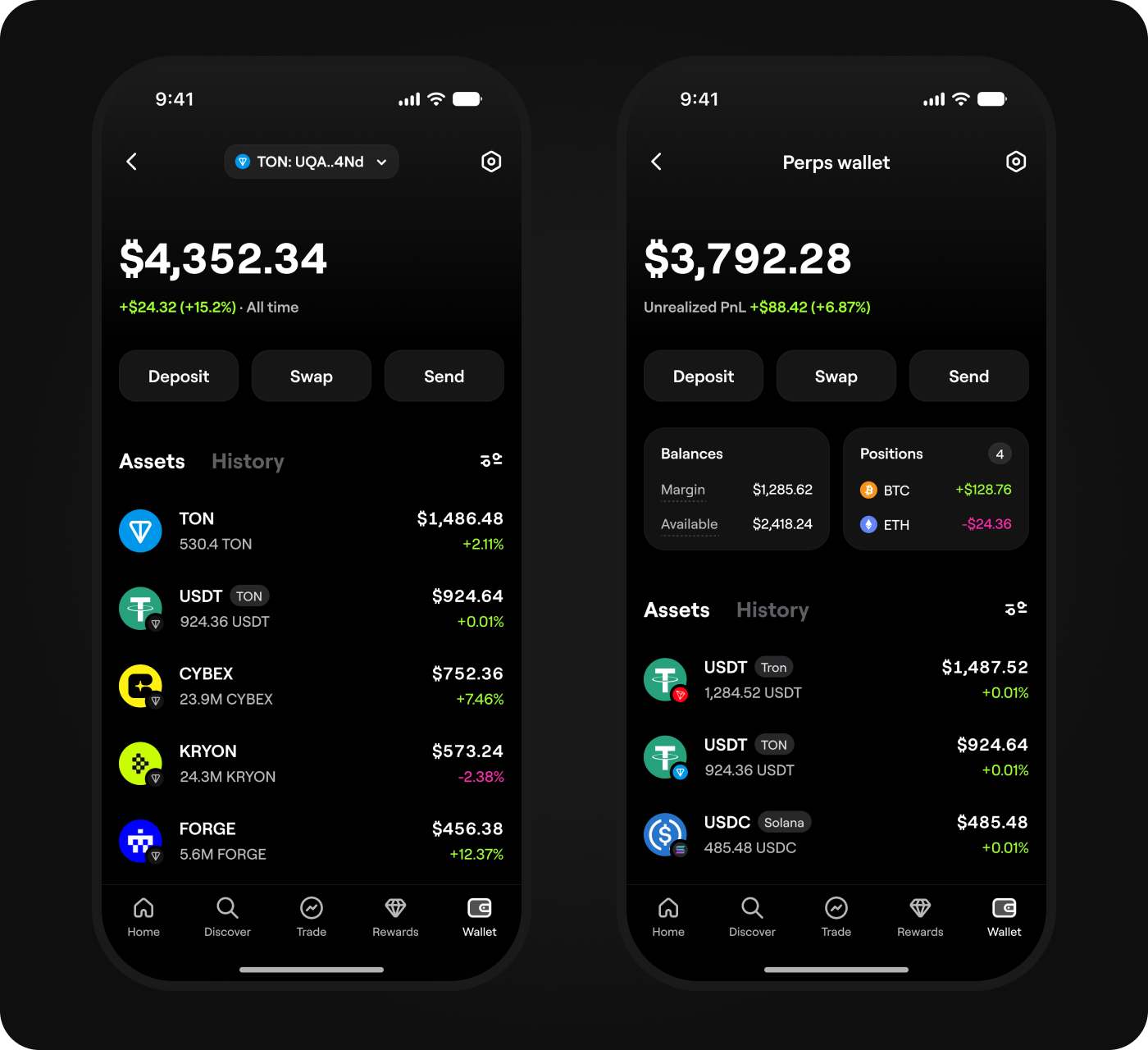
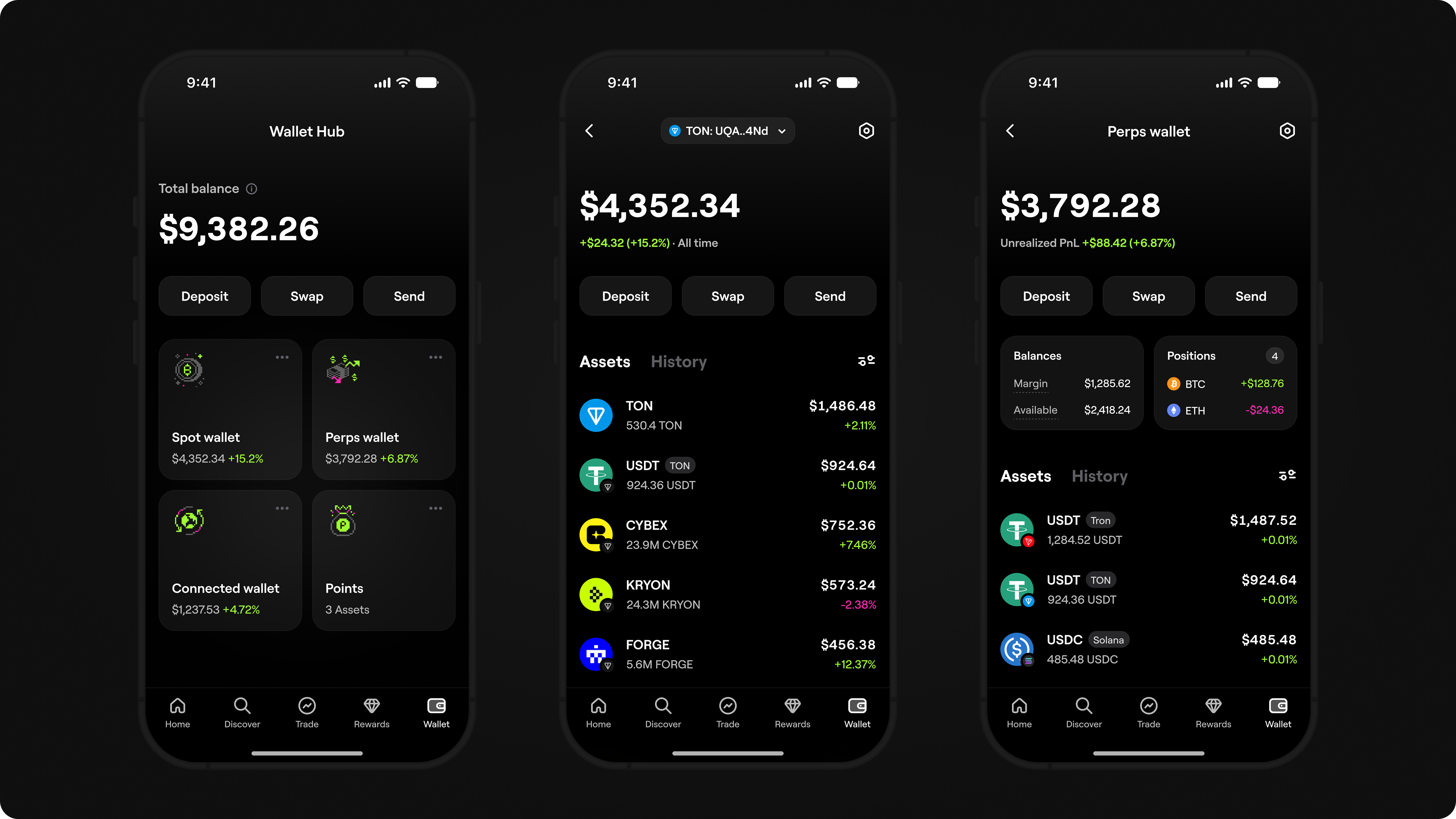
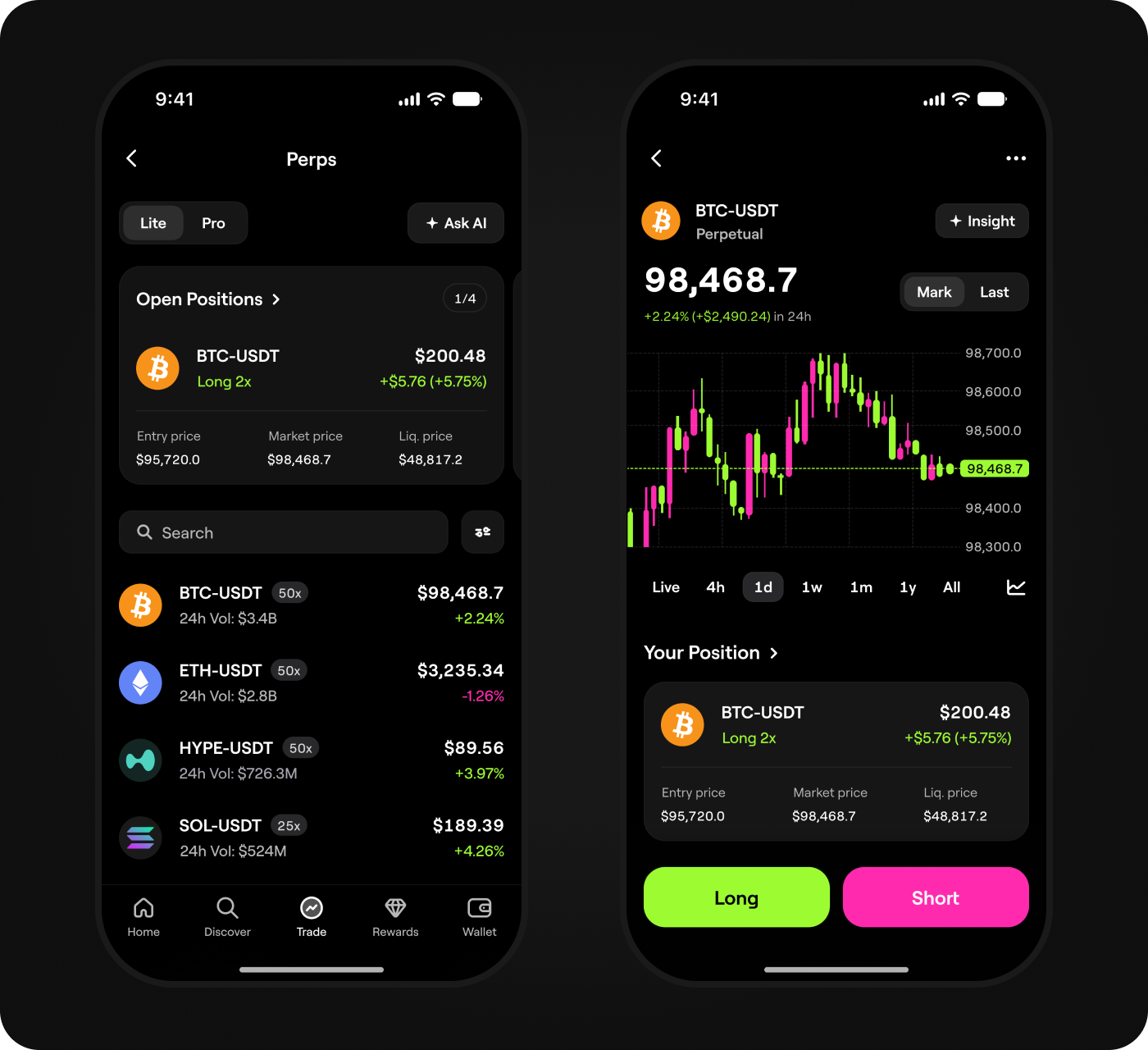
Blum is a crypto trading app with 95M+ users. I led the end-to-end design of Perpetual Trading and introduced two modes for leveraged trading: Lite, a simpler entry point for users new to perps, and Pro, a full trading workspace for experienced traders.
 Blum
BlumBuilt Perpetual Trading from 0→1, attracting
1.2M+ new traders to Blum in 6 months
Blum is a crypto trading app with 95M+ users. I led the end-to-end design
of Perpetual Trading and introduced two modes for leveraged trading: Lite,
a simpler entry point for users new to perps, and Pro, a full trading workspace
for experienced traders.
Context
were buying and selling tokens inside Blum. Perpetual Trading was the next step
in expanding the trading ecosystem: it brought leveraged trading to Blum and
helped attract traders who already traded perps on CEX platforms.
Problem
For the business: Spot Trading had already created real trading activity inside
Blum, but it focused on buying and selling tokens. Perpetual Trading could expand
Blum into leveraged trading, attract perps traders from CEX platforms, and create
a new source of trading volume and fee revenue.
For users: Most Blum users had not traded perps before. They were interested in
leveraged trading, but existing products were complex and stressful, assuming users
already understood leverage, margin, liquidation, and position management. Users
needed a clearer, less intimidating way to try perps and understand the risks before
opening a position.
Goal
the entry barrier for users new to perps, give experienced traders a professional
workspace, and create new trading activity, volume, and fee revenue.
My role
the product structure, core trading flows, and two-mode UX architecture, built the
scalable design system, and worked closely with product and engineering to ship
the product.
Shared trading architecture
for Spot Trading, then adapted them for Perpetual Trading. This kept the experience
familiar for users and helped the team ship the product two months ahead of the
original plan.
Benchmarking
trading journey: from finding a market and evaluating its data to configuring leverage,
managing risk, and opening a position. I compared how these products explained
leverage and liquidation, exposed market data, and supported position management
for users new to perps and experienced traders.
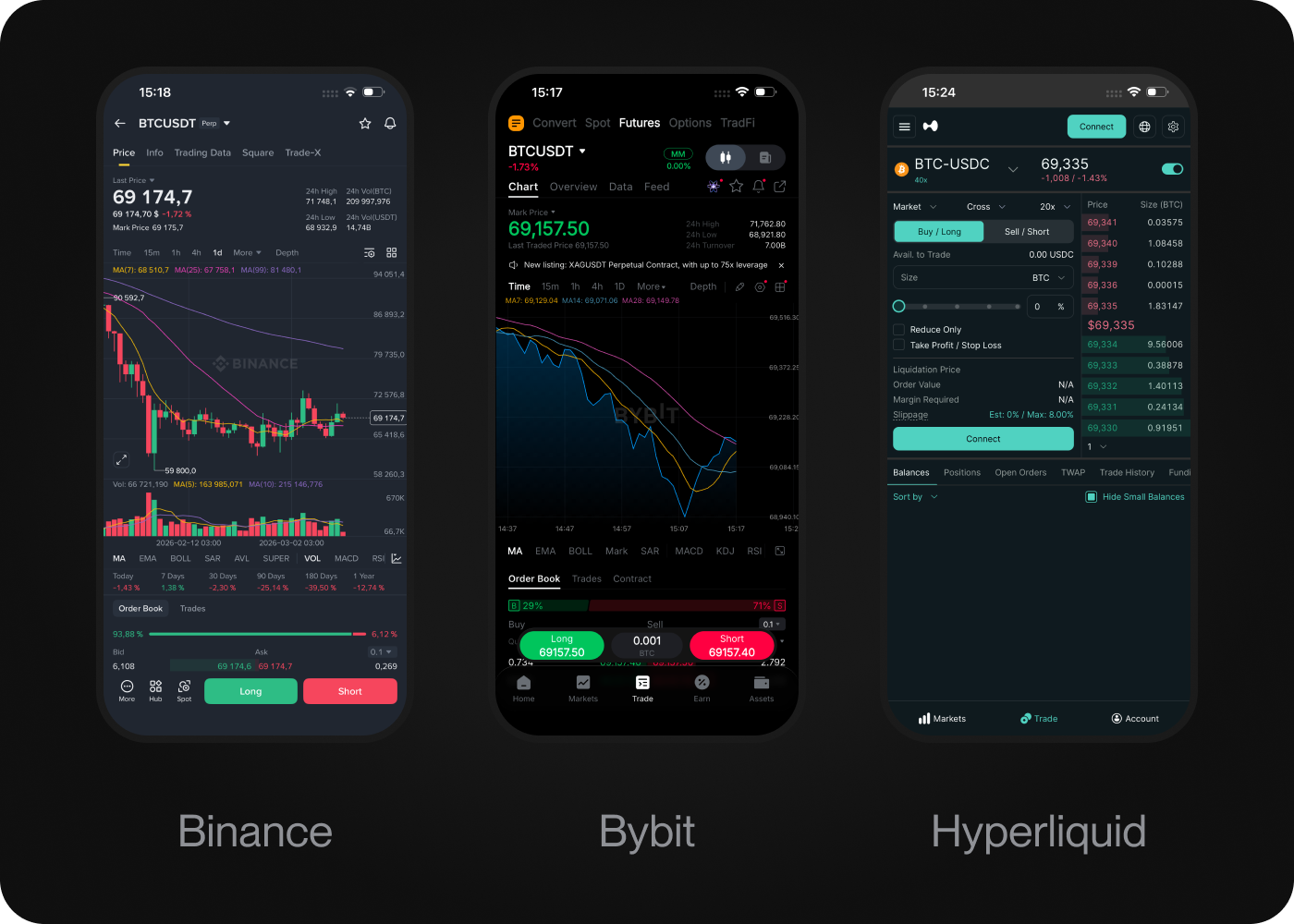
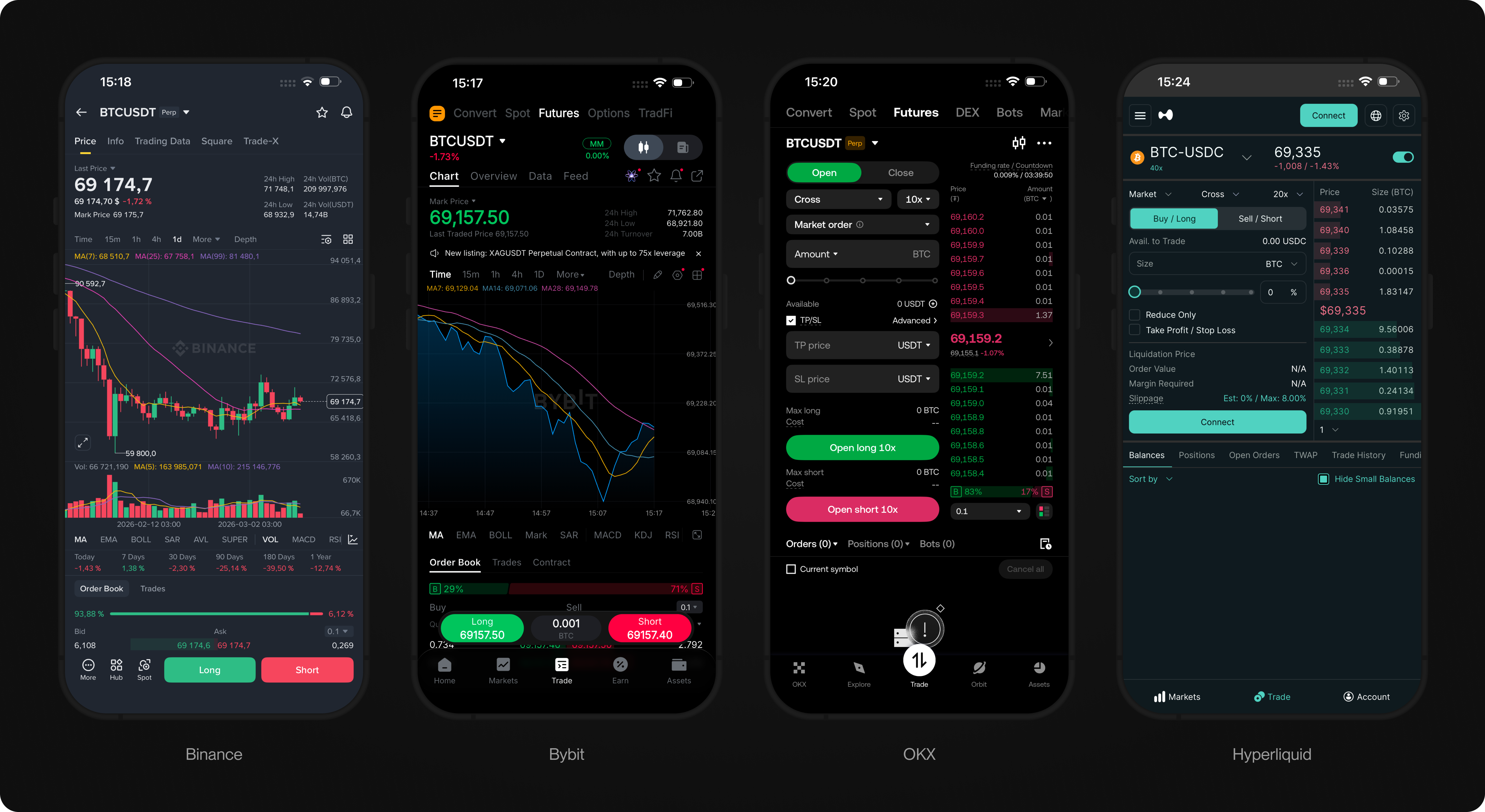
Benchmarking insight
Across the products I reviewed, the same pattern kept appearing. They worked
well for traders who already understood leverage, margin, liquidation, and position
management, but made the first trade complex and stressful for users new to perps.
For Blum, this pointed to an opportunity: make leveraged trading easier to approach
while preserving the market context, risk controls, and speed experienced traders
needed.
Discovery
The benchmarking showed where existing products created friction. I then
interviewed 8 Blum users new to perps and 5 experienced perps traders from
CEX platforms to see how these issues affected them, comparing their feedback
with product metrics. I identified three key problems:
1. Users new to perps lacked confidence
Leverage, margin, liquidation, position size, and Take Profit / Stop Loss
raised questions before they opened their first position.
2. Too much information made the first position hard to understand
Users new to perps understood basic buy and sell flows, but struggled when
risk, leverage, order settings, and position details appeared on the screen
at the same time.
3. Experienced traders needed a full trading workspace
They needed key metrics, a chart, an order form, leverage controls,
Take Profit / Stop Loss, open positions, and fast execution in one interface.
The benchmarking showed where existing products created friction. I then interviewed 8 Blum users new to perps and 5 experienced perps traders from CEX platforms to see how these issues affected them, comparing their feedback with product metrics. I identified three key problems:
1. Users new to perps lacked confidence
Leverage, margin, liquidation, position size, and Take Profit / Stop Loss raised questions before they opened their first position.
2. Too much information made the first position hard to understand
Users new to perps understood basic buy and sell flows, but struggled when risk, leverage, order settings, and position details appeared on the screen at the same time.
3. Experienced traders needed a full trading workspace
They needed key metrics, a chart, an order form, leverage controls, Take Profit / Stop Loss, open positions, and fast execution in one interface.
Strategy
The research showed that one trading interface could not work equally well for both
user groups. Users new to perps needed a clearer and less intimidating entry point,
while experienced traders needed a professional trading workspace.
I therefore structured Perpetual Trading around two modes: Lite Mode for users new
to perps and Pro Mode for experienced traders. Both modes shared the same core
trading architecture, but gave each group the level of complexity, context, and control
they needed. Based on this, I formed two hypotheses:
Hypothesis 1
If I build Lite Mode around a clear setup for opening a first position, users
new to perps will understand the risks more easily and be more likely to open
their first position, helping Blum increase conversion and 7-day retention.
Hypothesis 2
If I build Pro Mode around the market context, risk controls, position
management, and speed experienced traders need, they will trade more
actively, helping Blum increase repeat trading and total trading volume.
Strategy
The research showed that one trading interface could not work equally well for both user groups. Users new to perps needed a clearer and less intimidating entry point, while experienced traders needed a professional trading workspace.
I therefore structured Perpetual Trading around two modes: Lite Mode for users new to perps and Pro Mode for experienced traders. Both modes shared the same core trading architecture, but gave each group the level of complexity, context, and control they needed. Based on this, I formed two hypotheses:
Hypothesis 1
If I build Lite Mode around a clear setup for opening a first position, users new to perps will understand the risks more easily and be more likely to open their first position, helping Blum increase conversion and 7-day retention.
Hypothesis 2
If I build Pro Mode around the market context, risk controls, position management, and speed experienced traders need, they will trade more actively, helping Blum increase repeat trading and total trading volume.
Success criteria
To measure whether the two-mode structure worked, I tracked six outcomes:
⁕ Increase conversion to first opened position
⁕ Increase 7-day retention after first position
⁕ Increase repeat trading
⁕ Increase average order size
⁕ Increase total trading volume
⁕ Both modes are actively used
⁕ Increase conversion to first opened position
⁕ Increase 7-day retention after first position
⁕ Increase repeat trading
⁕ Increase average order size
⁕ Increase total trading volume
⁕ Both modes are actively used
I evaluated the new experience after each mode reached a minimum threshold
of 1,000+ position page sessions and 500+ opened positions. I then compared key
behavioral metrics across activation, retention, and trading activity.
Solution
The core UX architectural decision was to build two trading modes within one
Perpetual Trading product. Lite Mode gives users new to perps a simpler way
to trade without being overwhelmed by complexity, while Pro Mode gives
experienced traders the speed, market context, and control they need.
The selected mode persists across sessions, so switching between Lite and
Pro feels like changing a preference within the same product, not moving
to a different one.
The core UX architectural decision was to build two trading modes within one Perpetual Trading product. Lite Mode gives users new to perps a simpler way to trade without being overwhelmed by complexity, while Pro Mode gives experienced traders the speed, market context, and control they need.
The selected mode persists across sessions, so switching between Lite and Pro feels like changing a preference within the same product, not moving to a different one.
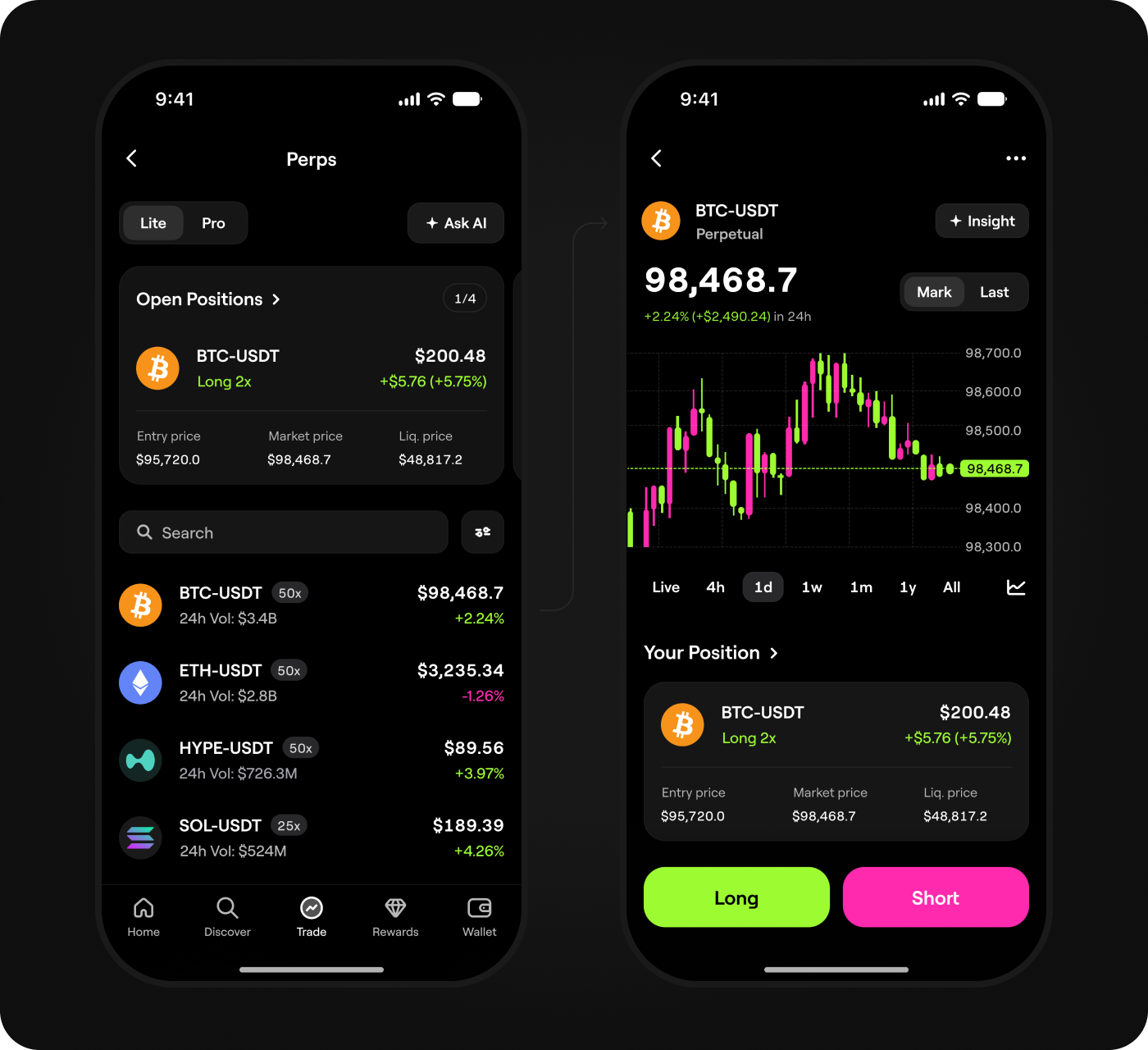
Lite Mode
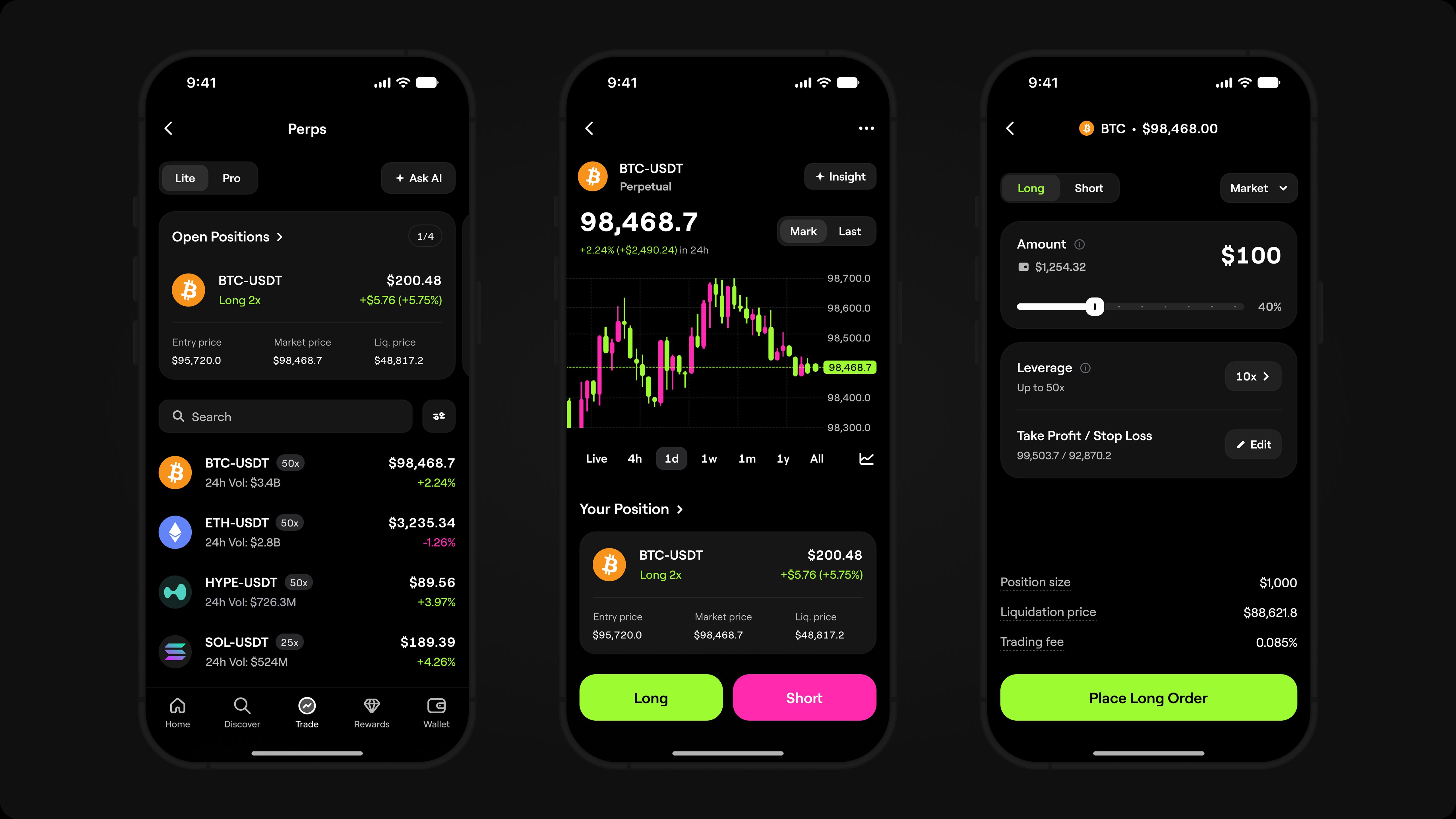
Lite Mode was designed as a simpler way to trade perps without the full complexity
of a professional trading terminal. It kept only the essentials: direction, amount,
margin, potential risk, and clear actions for opening and closing a position. This
reduced cognitive load while keeping the key risks visible.
Lite Mode was designed as a simpler way to trade perps without the full complexity of a professional trading terminal. It kept only the essentials: direction, amount, margin, potential risk, and clear actions for opening and closing a position. This reduced cognitive load while keeping the key risks visible.
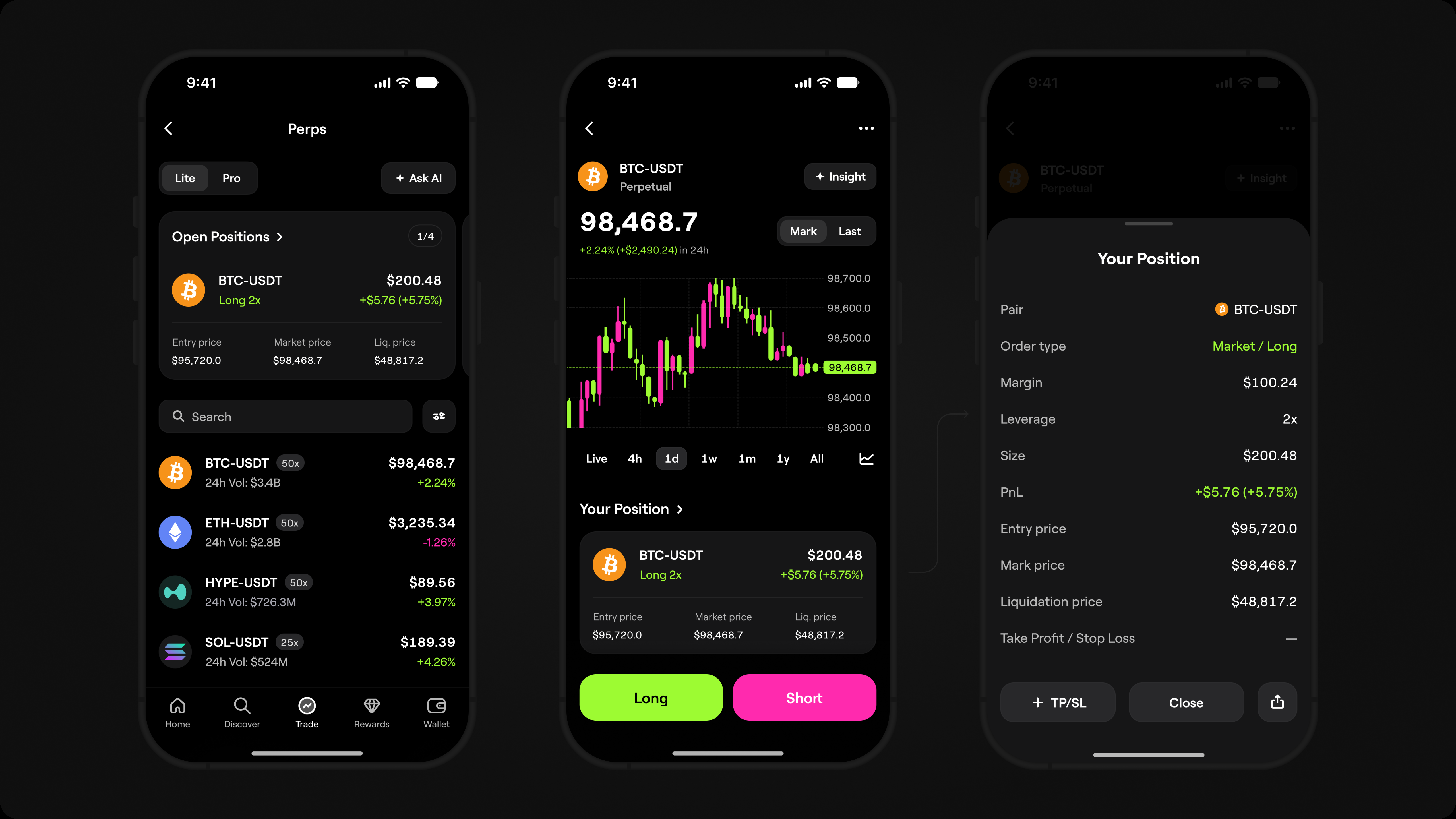
Margin-based order setup
The trading flow was built around Margin Mode because starting with a margin
amount was more familiar for users new to perps coming from Spot Trading. Instead
of starting with position size, users could enter the amount they were ready to use
and see how it affected position size, leverage, and liquidation risk before opening
a position.
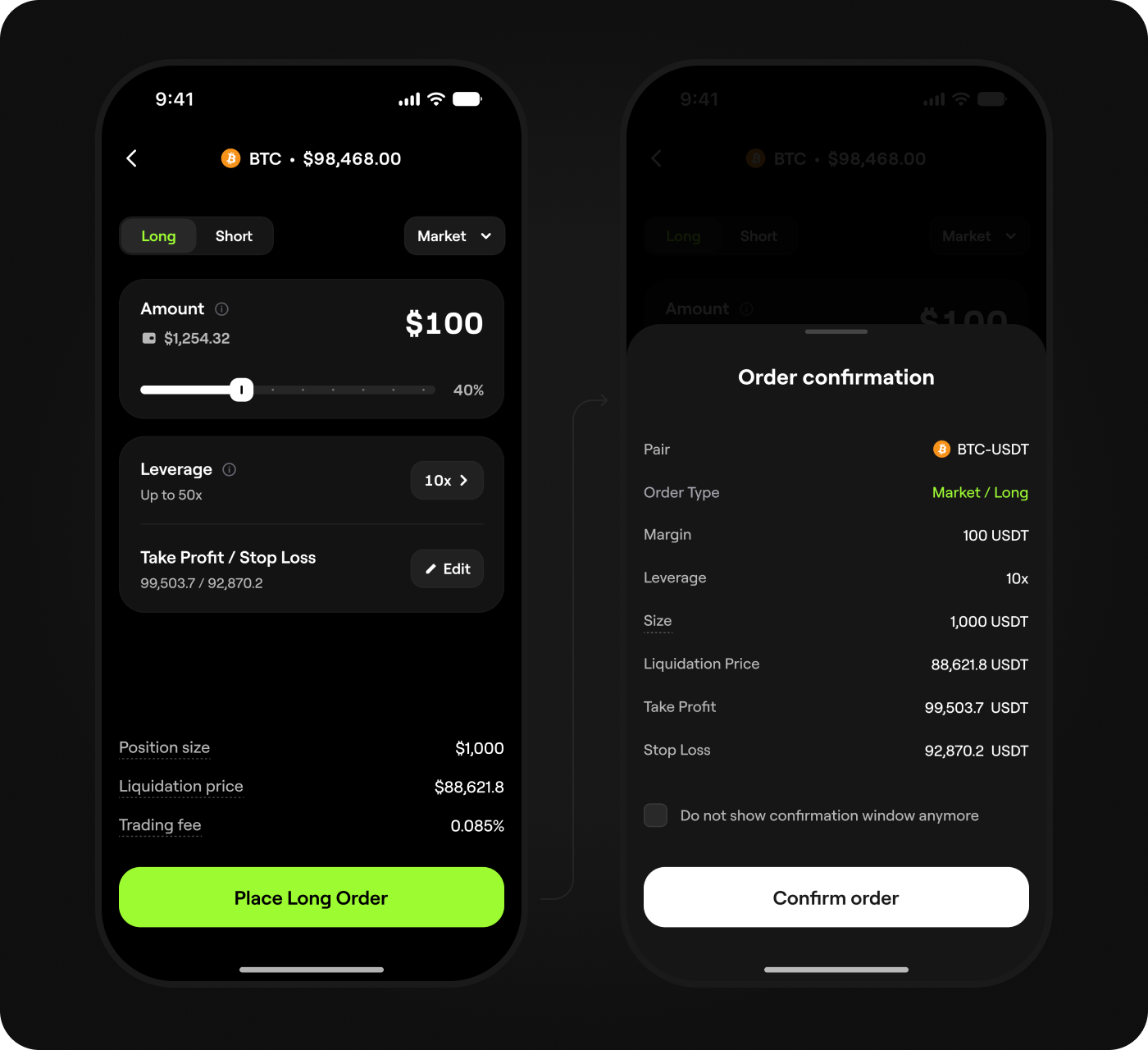
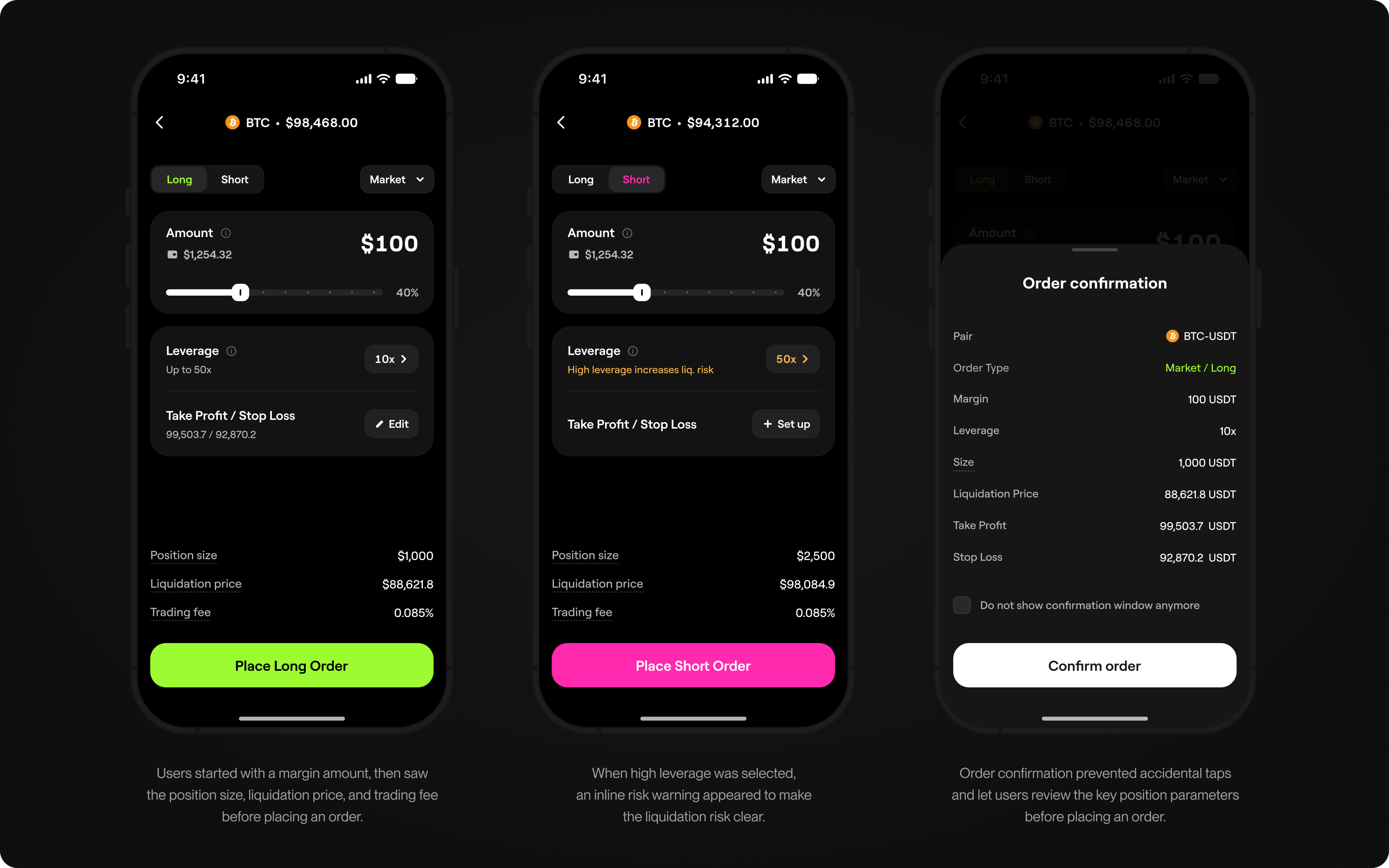
When a high leverage is selected, a risk warning appears inline to protect users from unexpected liquidation.
Order confirmation prevents accidental taps and lets users review key position parameters before placing an order.
Pro Mode
Pro Mode was built for experienced perps traders who needed speed, market
context, and control. It placed the chart, order form, leverage controls, TP/SL,
open positions, and fast execution in one workspace. Traders could analyze the
market, open or manage a position, and act without switching between screens
or losing context.
Pro Mode was built for experienced perps traders who needed speed, market context, and control. It placed the chart, order form, leverage controls, TP/SL, open positions, and fast execution in one workspace. Traders could analyze the market, open or manage a position, and act without switching between screens or losing context.
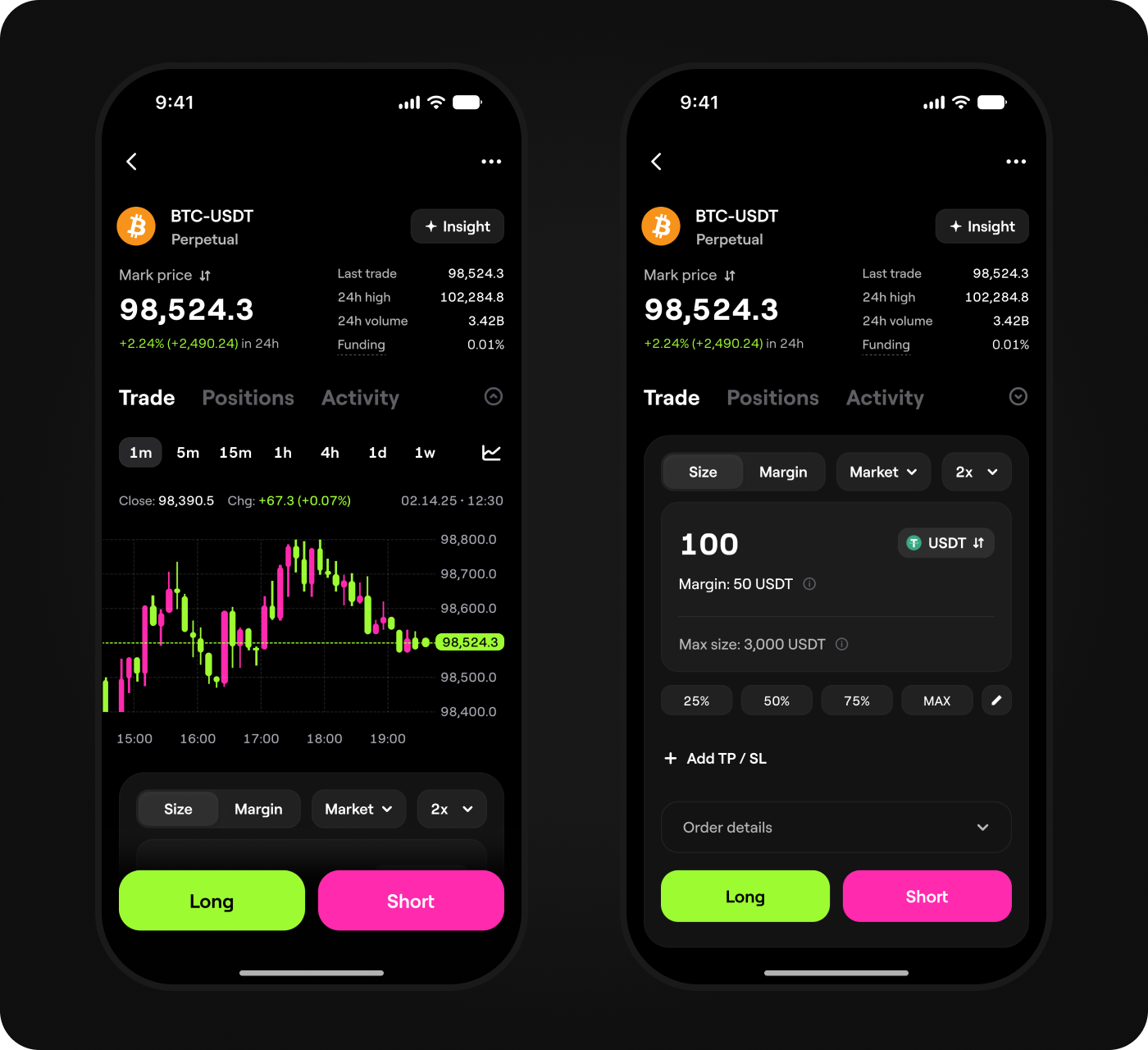
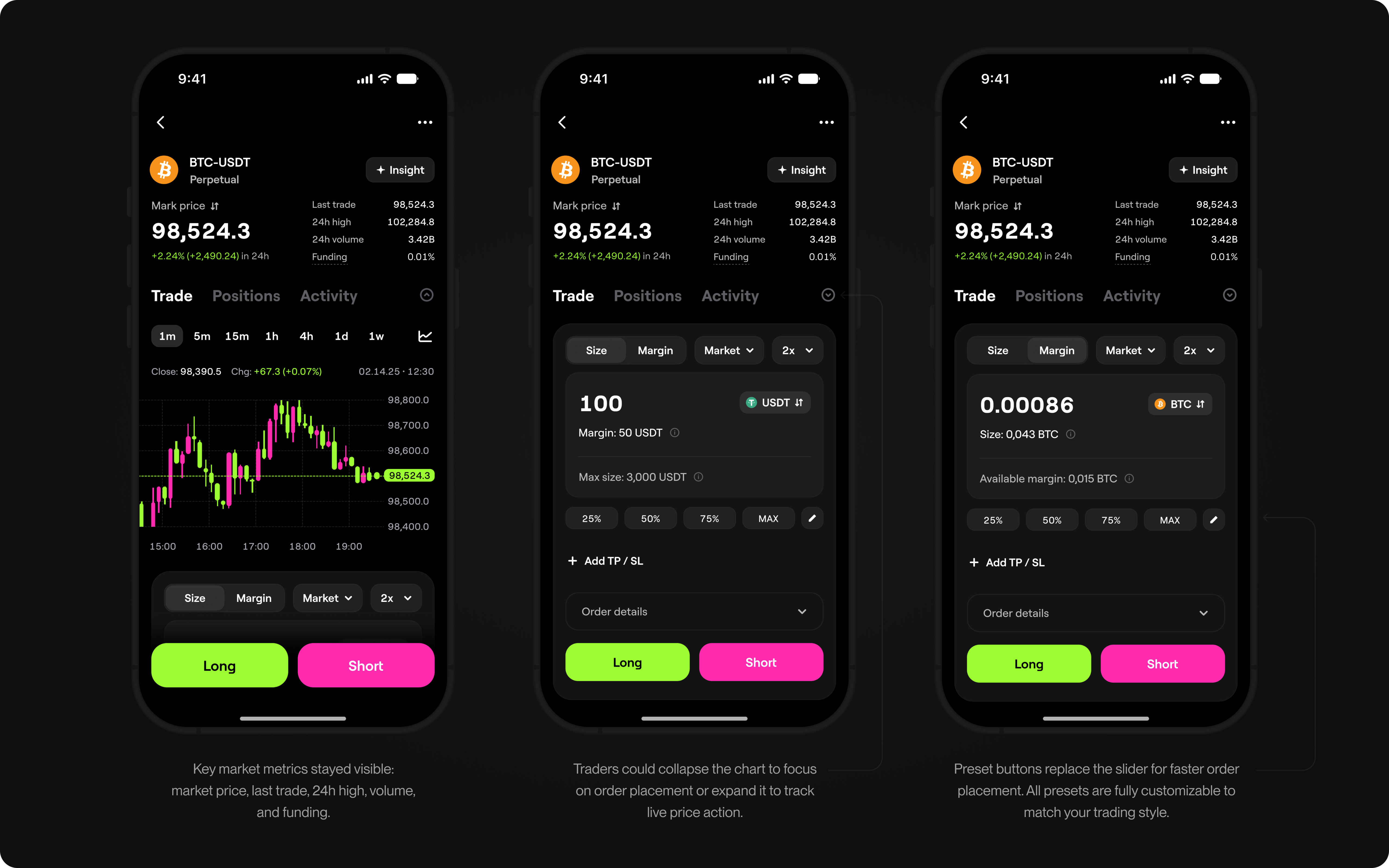
Key metrics such as Market price, Last trade, 24h high price, volume and funding always on screen. Collapse chart to focus on trading, expand to track live price action
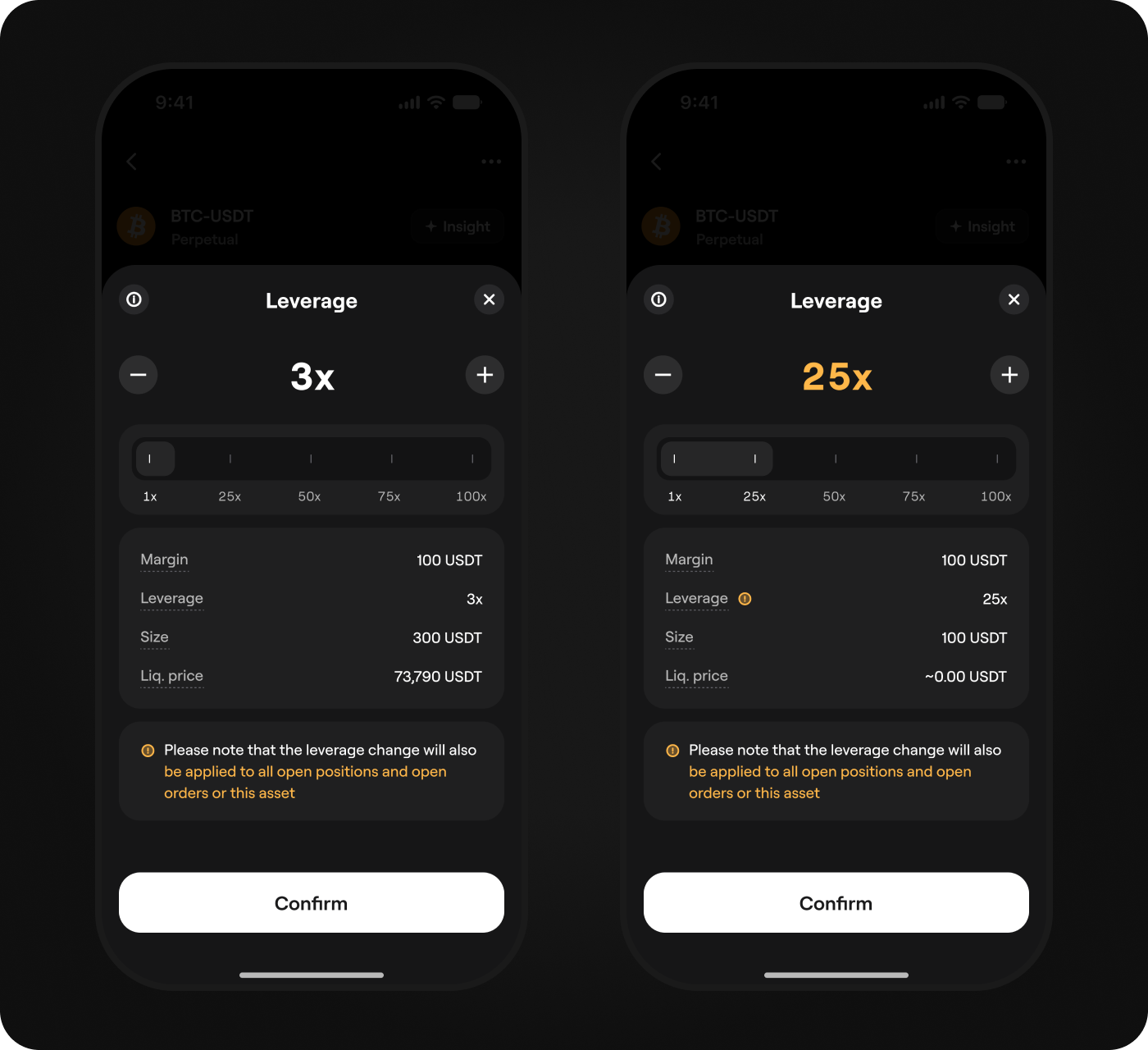
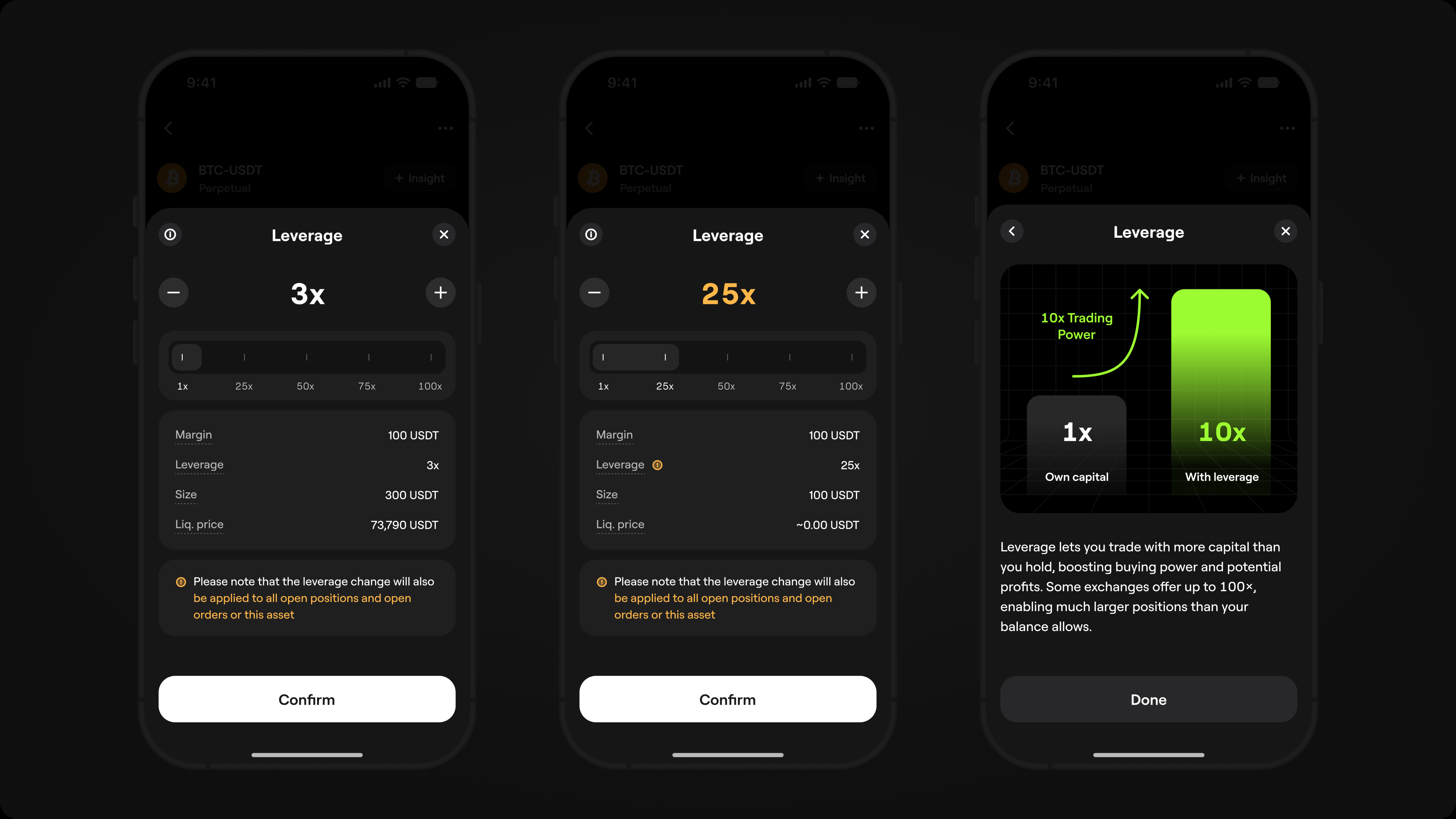
Flexible leverage controls
Traders could adjust leverage with a slider or +/- controls. As leverage changed,
position size and liquidation price updated instantly, showing its impact before
confirmation. When high leverage was selected, an inline risk warning appeared,
keeping the trader informed without interrupting the flow.
Traders could adjust leverage with a slider or +/- controls. As leverage changed, position size and liquidation price updated instantly, showing its impact before confirmation. When high leverage was selected, an inline risk warning appeared, keeping the trader informed without interrupting the flow.
Take Profit / Stop Loss
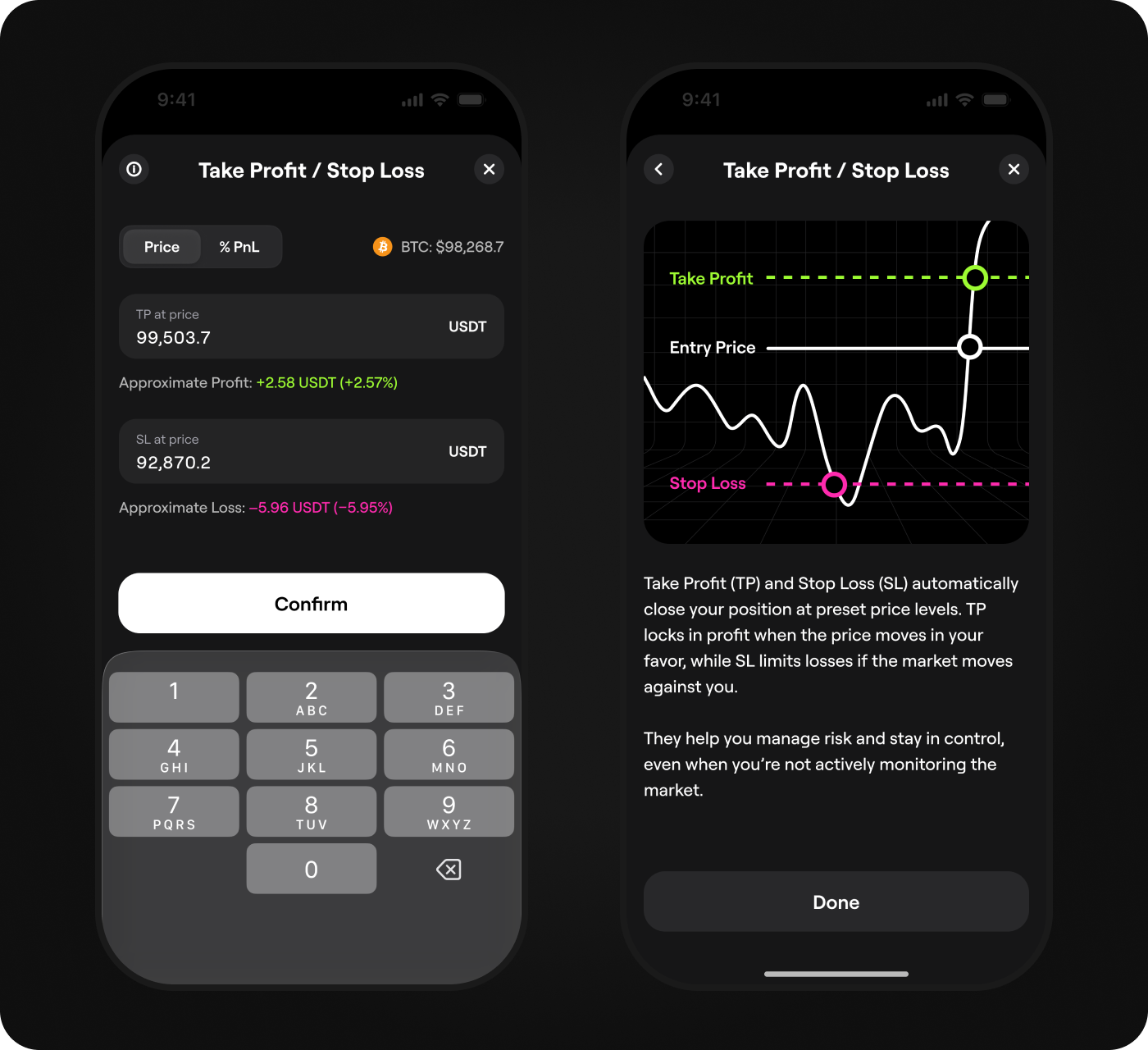
Take Profit and Stop Loss could be set when placing an order or added to an already
open position. Once set, the levels appeared directly on the chart and could be
adjusted by dragging, without leaving the trading screen. This gave traders a clear
way to manage their exit strategy while staying in the market context.
Take Profit and Stop Loss could be set when placing an order or added to an already open position. Once set, the levels appeared directly on the chart and could be adjusted by dragging, without leaving the trading screen. This gave traders a clear way to manage their exit strategy while staying in the market context.
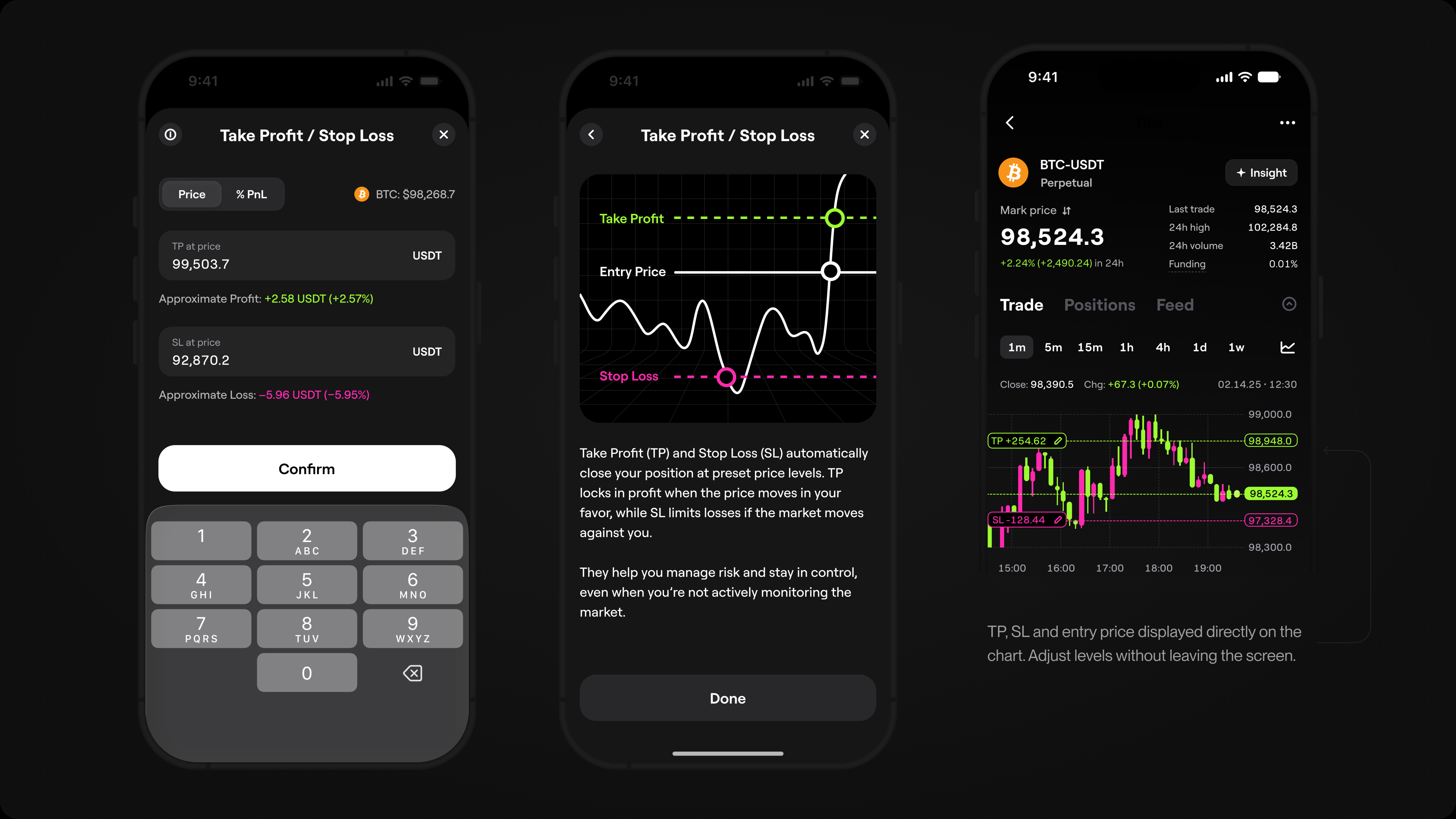
Take Profit, Stop Loss and entry price displayed directly on the chart. Adjust levels without leaving the screen.
Positions, Orders, History
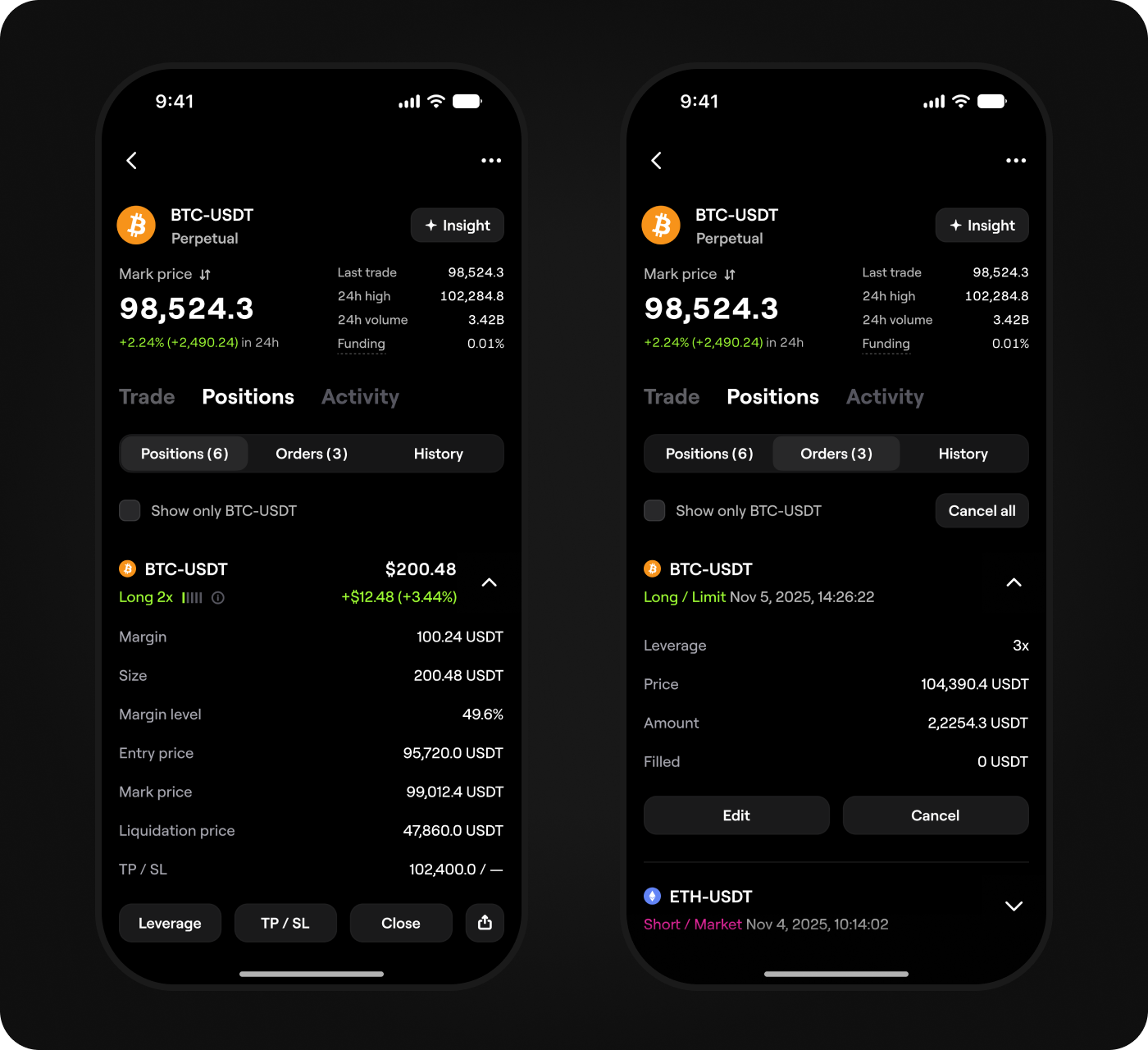
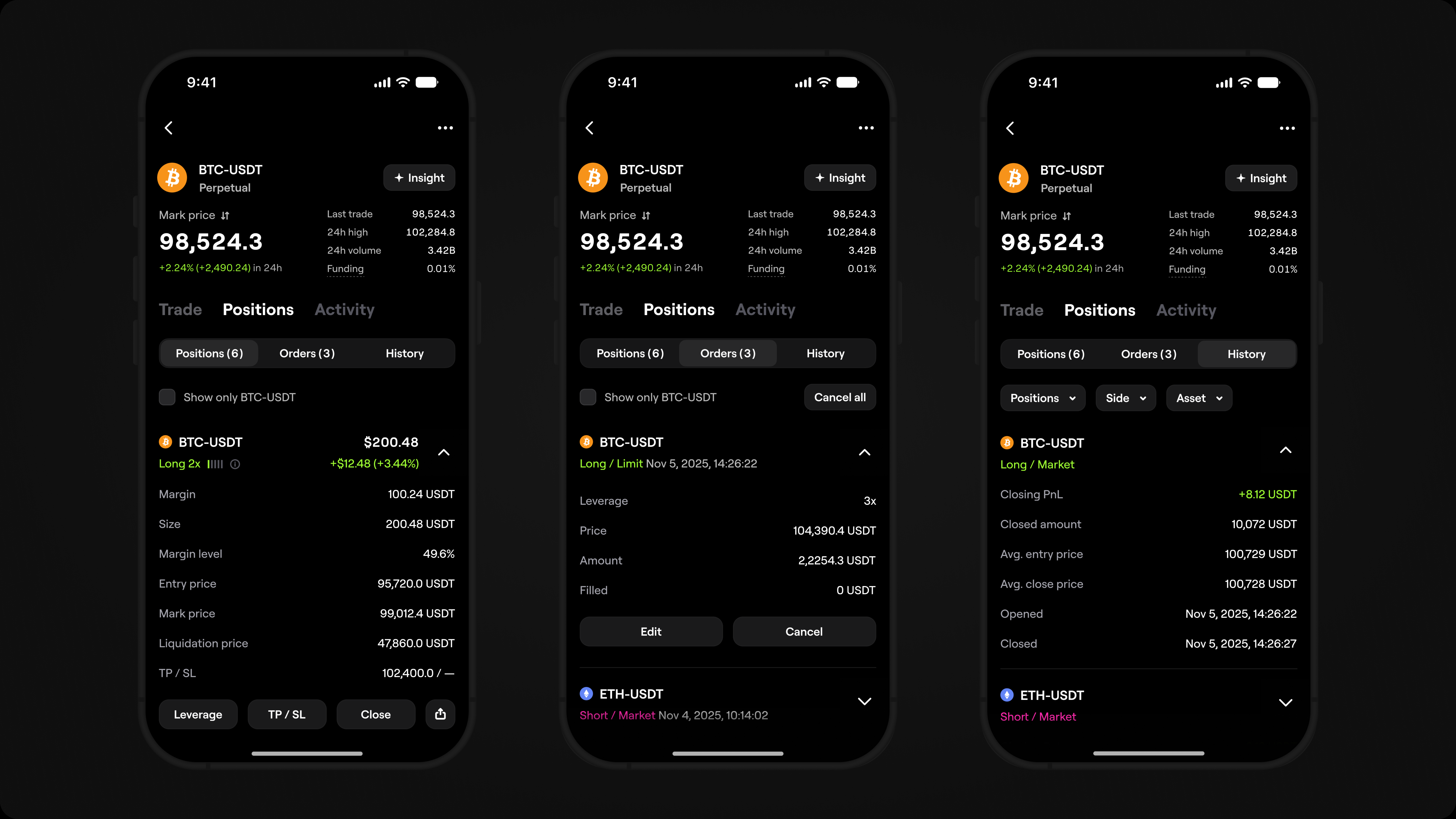
Pro Mode keeps all position management on the trading page. Active positions,
open orders, and trade history are all in one place. Traders can review positions,
track open orders, and check past trades without leaving the market context.
Key actions such as adjusting leverage, setting TP/SL, and closing a position
are available inline.
Pro Mode keeps all position management on the trading page. Active positions, open orders, and trade history are all in one place. Traders can review positions, track open orders, and check past trades without leaving the market context. Key actions such as adjusting leverage, setting TP/SL, and closing a position are available inline.
User testingUX Testing
To validate the new experience, I tested key perps scenarios with 8 users new
to perps and 5 experienced traders through one-on-one sessions and independent
tasks. I compared their feedback and observed behavior with product metrics,
focusing on three questions:
- 1 .Does Lite Mode reduce complexity and help users new to perps
open their first position while understanding the key risks? - 2 .Does the margin-based setup help users new to perps understand
how margin and leverage affect position size and liquidation risk? - 3 .Does Pro Mode give experienced traders the market context, data,
and control they need to analyze and manage positions effectively?
UX Validation Results
1. Lite Mode lowered the entry barrier

Tests showed that users new to perps completed the first-position
flow with fewer questions and mistakes. After opening a position,
they were more likely to continue exploring and trading in Lite Mode.
2. Margin-based setup made the first position easier to understand
Starting with a margin amount helped users understand its impact on
position size, leverage, and liquidation risk, making the overall trading
flow easier to navigate.
3. Pro Mode helped experienced
traders act faster
Having the chart, order form, open positions, and key controls
in one workspace helped traders analyze the market and manage
positions without losing context.
4. Experienced traders wanted
deeper chart interaction

Experienced traders asked for deeper chart controls, including
adjustable levels, editable parameters, and a clearer way to track
position changes directly on the chart.
Results
I designed and launched Perpetual Trading from 0 to 1, bringing leveraged trading
into Blum and helping the team ship the product two months ahead of schedule
by reusing the shared trading architecture from Spot. In its first six months, Perpetual
Trading attracted 1.2M+ new traders and became a new source of trading activity,
volume, and fee revenue for Blum.
540K+
Monthly active users
1.85M+
Total perps traders
+1.2M
New traders in 6 months after launch
52.3%
7-day retention after first trade
540K+
Monthly active users
+1.2M
New traders in 6 months after launch
1.85M+
Total perps traders
52.3%
7-day retention after first trade
Key Learning
A complex trading instrument can become intuitive for a wider audience when the
interface is designed around different levels of trading experience. The goal is not
to remove functionality, but to remove barriers: users new to perps need a simpler
entry point, while experienced traders need speed, context, and control.